




Start a tenant change
- Under Apartments, open the apartment concerned.
- Click Tenant change.
- Fill in the details for the move-out, final invoice and new tenant.
- Click Perform change.
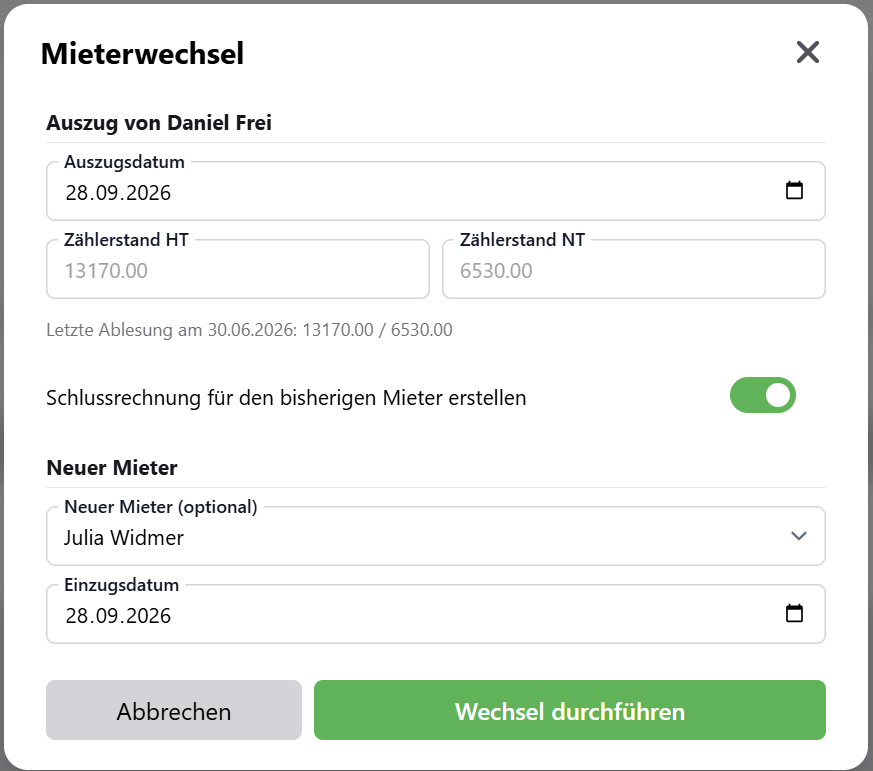
Move-out
- Move-out date: the last day of the previous tenant. It must be after the last reading.
- Meter reading at move-out: with the dual tariff, you enter HT and NT. As a help, the app shows you the last reading. The new reading must not be lower.
Final invoice
With Create final invoice for the departing tenant, SchäferStrom directly creates an invoice from the day after the last reading up to the move-out date. For vZEV, you also enter the solar power share in kWh for this period.
The final invoice requires a current tenant and a meter reading at move-out. If the tariffs or payment details are not yet complete, the app takes you there first.
New tenant
- Under New tenant (optional), choose the successor or No new tenant (vacant).
- Move-in date: mandatory if you choose a new tenant. It must not be before the move-out date.
- Meter reading at move-in (optional): enter it if time passes between move-out and move-in.
Without a move-in reading, the consumption during the vacancy is billed to the new tenant.
What happens
When you click Perform change, SchäferStrom does everything in one step:
- The meter reading at move-out is saved as a normal reading.
- If requested, the final invoice for the previous tenant is created.
- The previous tenancy ends on the move-out date.
- The new tenancy begins on the move-in date.
- Any meter reading at move-in is saved.
The new tenant's next invoice starts after the move-in reading. If there is none, it starts after the move-out reading.