




Plans at a glance
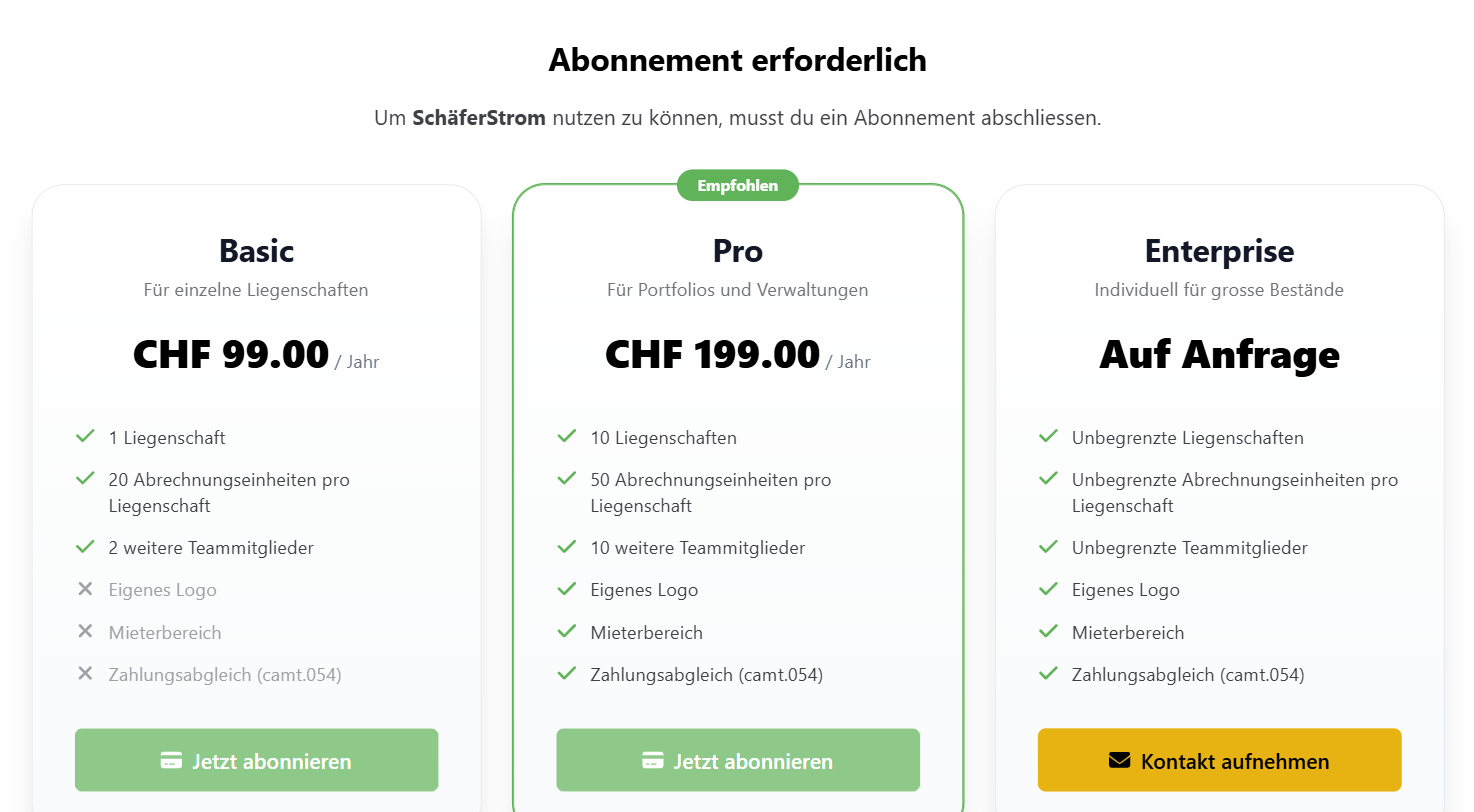
SchäferStrom is billed annually. The plans differ mainly in the number of properties, billing units per property and team members, as well as in a few additional features:
- Custom logo on invoices and credit notes
- Customer area, where tenants view their invoices online
- Payment reconciliation, where payments from a camt.054 file are automatically matched to the invoices
You can find the current prices and limits on the pricing page. For larger portfolios, Enterprise is available on request.
Start a subscription
- On the Subscription required page, choose a plan and click Subscribe now.
- You will be redirected to Stripe's secure payment page. There you enter your payment details.
- After successful payment, you automatically return to the app and can get going.
You can cancel the subscription at any time, and there are no hidden fees.
How limits are counted
- What counts is always the plan of the owner of a workspace. Team members do not need their own subscription.
- The number of properties counts across all workspaces belonging to the same person.
- Billing units are the apartments (or, for vZEV, the buildings) of a property.
- For team members, the owner does not count, but pending invitations do.
If you reach a limit, the app shows you a notice. Features that are not included in your current plan are marked with PRO.
Manage your subscription
Under Account > Payment & Billing you can see your plan, the billing period, the price and the status.
- Manage subscription opens Stripe's customer portal. There you change the payment method, download receipts or cancel.
- After cancelling, you keep access until the end of the paid period. Until then, you can resume the subscription with Resume subscription.
Switching to a smaller plan
If you switch to a plan without certain additional features, your settings are kept but no longer used. Your custom logo will then no longer appear on new invoices and the customer area is no longer accessible. After upgrading again, everything is back as before.